
Network support services help businesses maintain secure, reliable, and high-performing networks through monitoring, maintenance, troubleshooting, and security management. From remote support and infrastructure maintenance to enterprise network management, these services minimize downtime, improve productivity, and ensure your network is ready to support business growth.
Network support services keep your business network running smoothly through monitoring, maintenance, troubleshooting, and security. They cover everything from fixing connectivity issues to managing enterprise-wide infrastructure—either remotely or on-site. The right service reduces downtime, protects your data, and frees your team to focus on core work.
A slow or broken network can bring an entire business to a standstill. Employees can’t access files, customers can’t complete orders, and every minute of downtime chips away at productivity and revenue. That’s why network support services have become essential for organizations of every size.
This guide breaks down the main types of network support services available today—from basic troubleshooting to full enterprise management. You’ll learn what each service involves, how they work together, and how to choose the right combination for your business. By the end, you’ll have a clear picture of how to keep your network secure, reliable, and ready for growth.
What is IT network support?
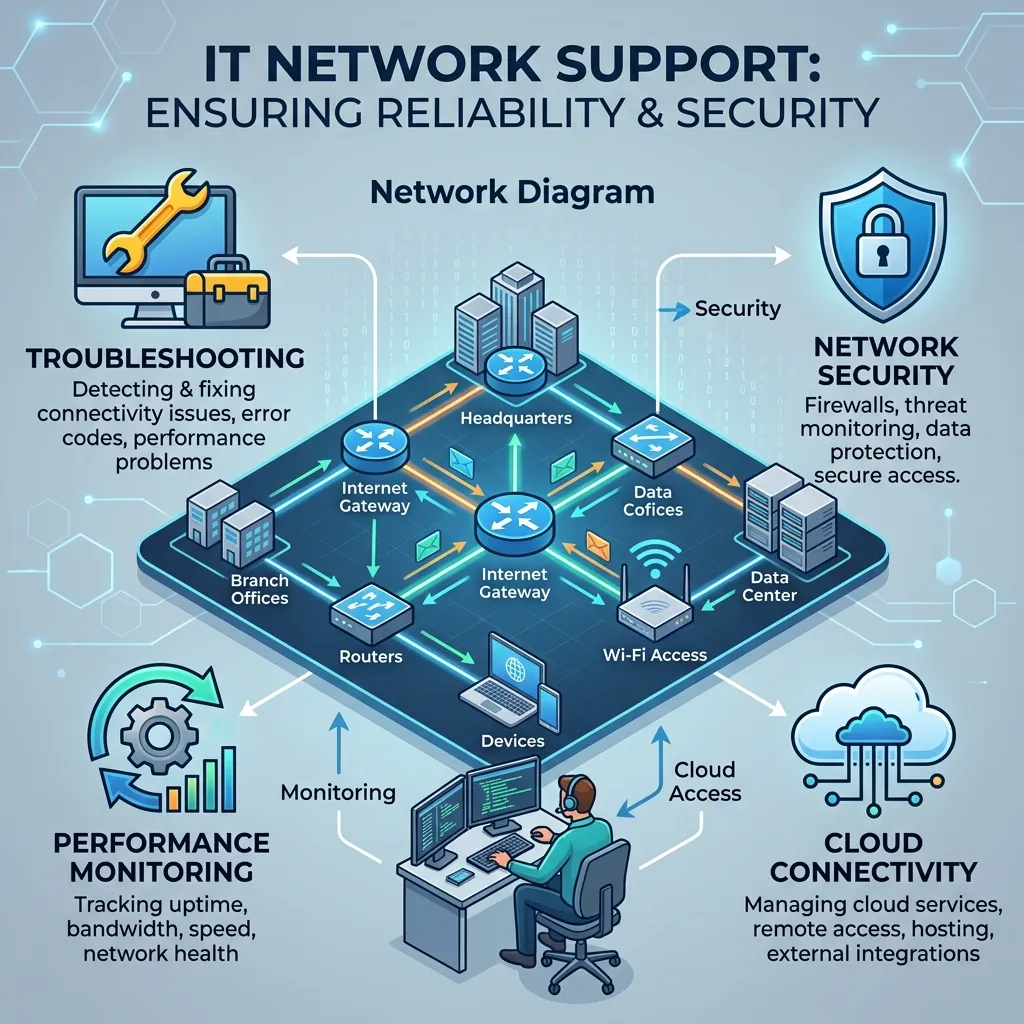
IT network support refers to the services and processes that keep a company’s computer network functioning properly. This includes setting up hardware, configuring software, resolving connectivity problems, and helping employees with day-to-day technical issues.
Think of IT network support as the foundation for everything else. It covers the routers, switches, servers, and devices that connect your team to the internet and to each other. When something goes wrong, network support technicians step in to diagnose and fix the issue—often before users even notice a problem.
Most businesses access IT network support in one of two ways: through an in-house IT department or by partnering with an external provider. Smaller organizations often outsource because hiring a full team is expensive. Larger companies may combine both, using internal staff for daily tasks and external specialists for complex projects.
How do managed network services work?
Managed network services involve outsourcing the management of your network to a third-party provider, often called a Managed Service Provider (MSP). Instead of reacting to problems as they happen, the provider takes a proactive role—monitoring, maintaining, and optimizing your network around the clock.
With a managed model, you typically pay a fixed monthly fee. This covers a defined set of services laid out in a service-level agreement (SLA). The SLA spells out response times, uptime guarantees, and exactly what the provider is responsible for.
The biggest advantage is predictability. You know your costs in advance, and you gain access to a team of specialists without the overhead of hiring them directly. Managed services suit businesses that want reliable performance without building a large internal IT department.
Choose managed network services if you value predictable costs and want experts handling your network so your team can focus on the business itself.
What does network infrastructure support involve?
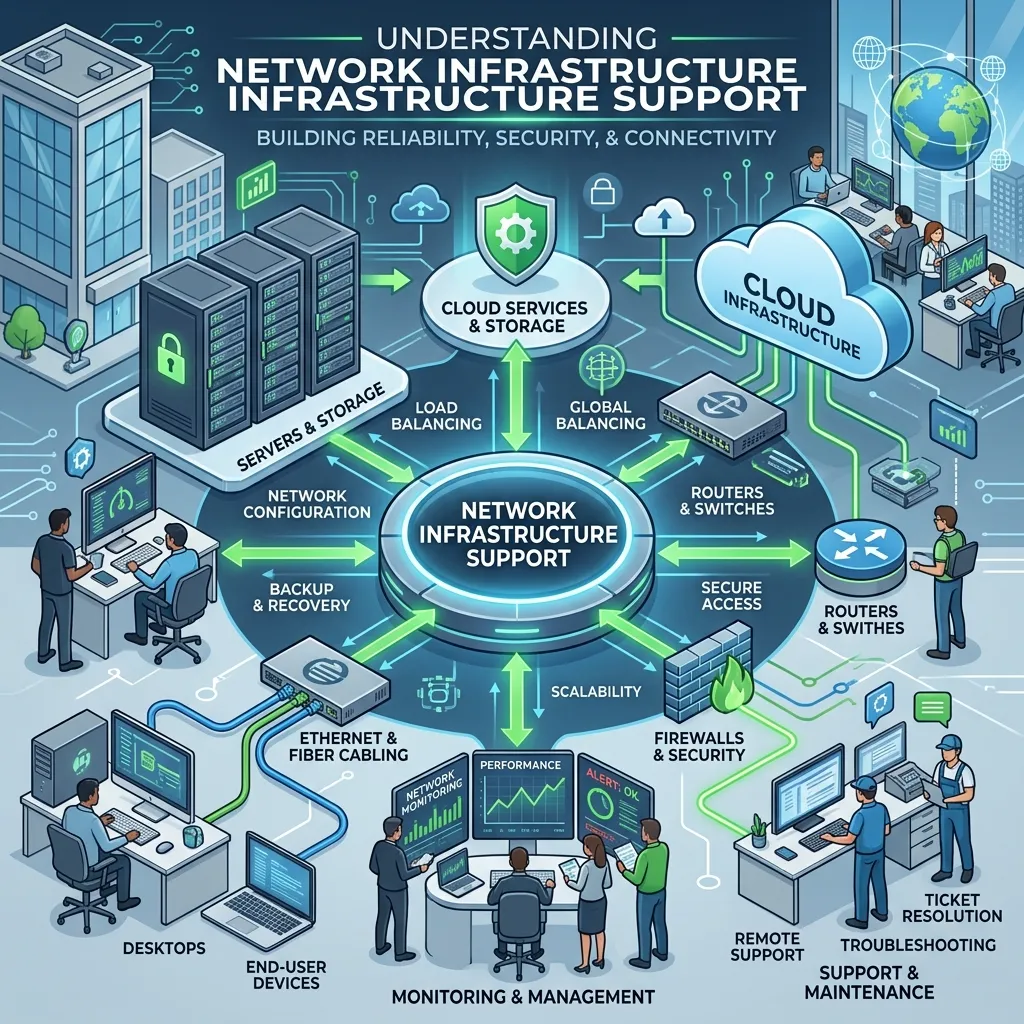
Network infrastructure support focuses on the physical and virtual components that make your network run. This includes routers, switches, firewalls, cabling, wireless access points, and the servers that store and process data.
Strong infrastructure support covers several key tasks:
- Installation and configuration of new hardware and software
- Upgrades to keep equipment current and capable
- Capacity planning so your network can handle growth
- Documentation of your setup for faster troubleshooting later
A well-supported infrastructure is the difference between a network that scales smoothly and one that buckles under pressure. As your business adds employees, locations, or applications, infrastructure support ensures the underlying systems keep pace.
What are business network solutions?
Business network solutions are tailored packages designed to meet the specific needs of an organization. Rather than offering a one-size-fits-all product, providers assess your goals, budget, and existing setup to recommend the right mix of services.
A small retail business might need a reliable point-of-sale network and secure Wi-Fi for customers. A growing professional services firm may require cloud connectivity, secure remote access, and room to expand. The solution looks different in each case.
Good business network solutions share a few traits. They’re scalable, so they grow with you. They’re secure, protecting sensitive data. And they’re reliable, minimizing the downtime that costs you money. The goal is always to align your network with your business objectives.
Why are network monitoring services important?
Network monitoring services continuously track the health and performance of your network. Specialized tools watch for unusual activity, traffic spikes, hardware failures, and security threats—then alert technicians the moment something looks off.
The real value of monitoring is catching problems early. A failing hard drive or an overloaded server often shows warning signs before it crashes completely. With monitoring in place, technicians can act on those signs and prevent an outage rather than scrambling to recover from one.
Monitoring also produces valuable data. Over time, you can spot patterns, identify bottlenecks, and make informed decisions about upgrades. This data-driven approach helps businesses plan ahead instead of constantly reacting.
What does computer network maintenance include?
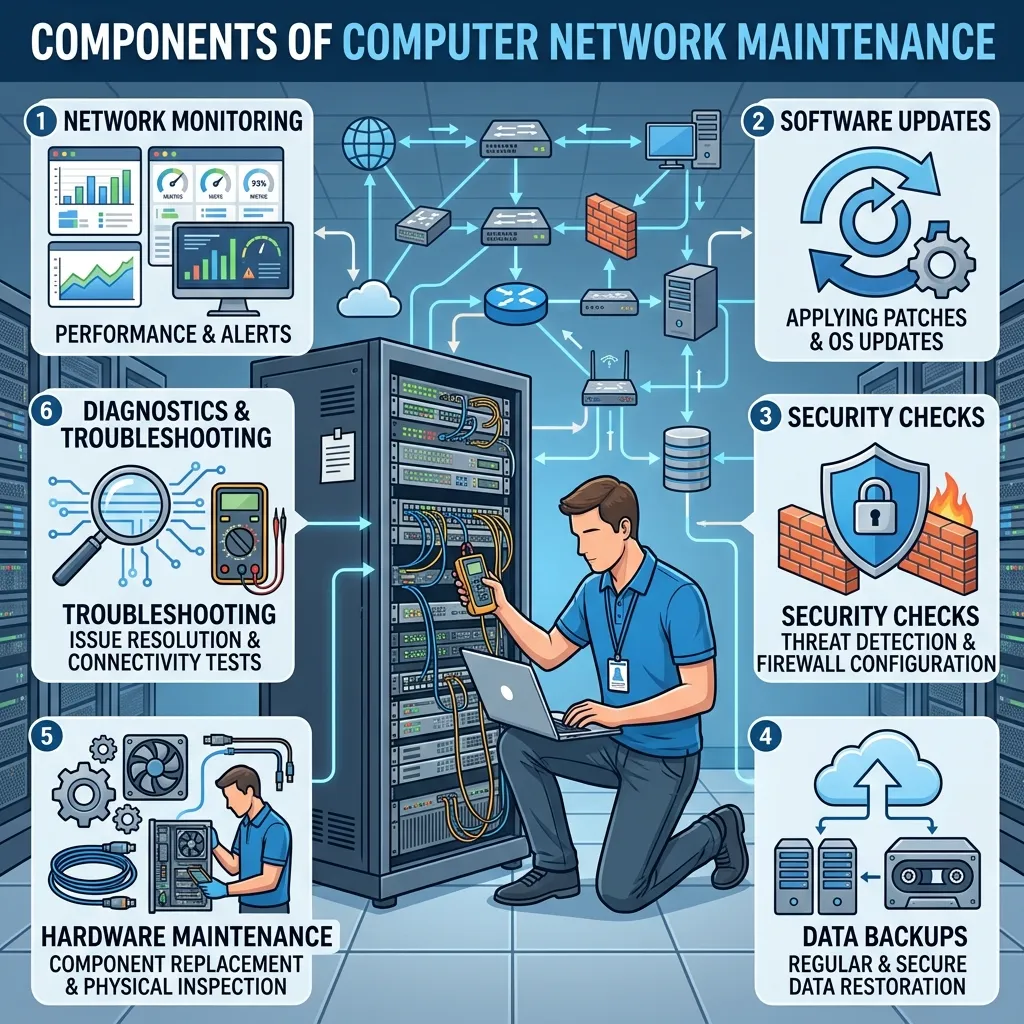
Computer network maintenance covers the routine tasks that keep a network healthy over the long term. Just as a car needs regular servicing, a network needs ongoing attention to perform at its best.
Typical maintenance activities include:
- Software updates and patches to fix bugs and close security gaps
- Hardware checks to catch wear and tear before it causes failures
- Backup management to ensure data can be recovered if disaster strikes
- Performance tuning to keep speeds high and lag low
Skipping maintenance is one of the most common reasons networks fail. Outdated software and neglected hardware create vulnerabilities and slowdowns. Regular maintenance keeps small issues from snowballing into major disruptions.
How do network security services protect your business?
Network security services defend your network against threats like malware, ransomware, phishing, and unauthorized access. With cyberattacks growing more sophisticated, security has become one of the most critical parts of network support.
Effective security combines several layers:
- Firewalls that filter incoming and outgoing traffic
- Antivirus and anti-malware tools that detect and remove threats
- Encryption that protects data in transit and at rest
- Access controls that limit who can reach sensitive systems
- Regular audits that find and fix weaknesses
A single breach can cost a business dearly—in money, downtime, and reputation. Network security services reduce that risk and help you stay compliant with regulations that govern how you handle customer and financial data.
What are the benefits of remote network support?
Remote network support allows technicians to diagnose and resolve issues without being physically present. Using secure remote-access tools, they can connect to your systems, troubleshoot problems, and apply fixes from anywhere.
The main benefits are speed and cost. Remote support resolves many issues in minutes rather than waiting hours for someone to arrive on-site. It also reduces travel costs, which keeps your overall support expenses lower.
Choose remote network support if you need fast response times and want to minimize costs—it handles the majority of common issues efficiently. For hardware failures or physical installations, on-site support remains necessary.
How does enterprise network management work?
Enterprise network management addresses the complex needs of large organizations with extensive networks. These networks often span multiple locations, support thousands of users, and run a wide range of applications—all of which demand careful coordination.
Enterprise management focuses on a few core priorities. It centralizes control so administrators can manage the entire network from one place. It enforces consistent security policies across every site and device. And it plans for scale, ensuring the network can support future growth without major overhauls.
For large businesses, fragmented networks create real risks—security gaps, inconsistent performance, and rising costs. Enterprise network management brings order to that complexity, giving organizations the visibility and control they need to operate efficiently.
What are network troubleshooting services?
Network troubleshooting services focus on identifying and fixing problems when they occur. When your network slows down, drops connections, or stops working entirely, troubleshooting specialists step in to find the root cause and restore service.
The troubleshooting process usually follows a clear path:
- Identify the symptoms—what’s not working and when it started
- Isolate the cause—test components to pinpoint the source
- Apply a fix—resolve the issue at its root
- Verify and document—confirm the fix and record it for future reference
Fast, effective troubleshooting minimizes downtime, which directly protects your productivity and revenue. The best providers don’t just fix the immediate problem—they look for ways to prevent it from happening again.
Choosing the right network support services for your business
The right combination of network support services depends on your size, industry, and goals. A small business might start with basic maintenance and remote support, while a large enterprise needs comprehensive management, robust security, and round-the-clock monitoring.
Start by assessing your current setup and identifying your biggest pain points. Are you struggling with frequent downtime? Worried about security? Planning to expand? Your answers will point you toward the services that matter most.
From there, look for a provider whose strengths match your needs. Review their service-level agreements, ask about response times, and check their track record with businesses like yours. A strong partner doesn’t just fix problems—they help your network become a foundation for growth rather than a source of frustration.
Frequently asked questions
How much do network support services cost?
Costs vary widely based on the size of your network and the services you need. Managed services typically run on a fixed monthly fee, which makes budgeting predictable. Smaller businesses may pay a few hundred dollars a month, while large enterprises with complex needs pay considerably more. Request a custom quote based on your specific setup.
What’s the difference between managed services and break-fix support?
Managed services are proactive—a provider monitors and maintains your network for a fixed fee to prevent problems before they happen. Break-fix support is reactive, meaning you call for help only when something breaks and pay per incident. Managed services usually cost less over time because they reduce downtime and prevent expensive emergencies.
Can small businesses benefit from network support services?
Yes. Small businesses often benefit the most because they rarely have the budget for a full in-house IT team. Outsourcing network support gives them access to expert help, better security, and reliable performance at a predictable cost—without the overhead of hiring specialists.
How quickly can remote network support resolve issues?
Many common issues are resolved within minutes using remote-access tools, since technicians can connect to your systems immediately rather than traveling to your location. More complex problems take longer, and hardware failures may still require an on-site visit.
Do I still need on-site support if I use remote network support?
In most cases, yes. Remote support handles the majority of software and configuration issues efficiently, but physical tasks—like installing hardware, replacing failed equipment, or running new cabling—require a technician on-site. The best providers offer both.
What are network support services?
Network support services are IT solutions that keep business networks running efficiently through monitoring, maintenance, troubleshooting, security, and infrastructure management.
Why are network support services important for businesses?
Network support services reduce downtime, improve network performance, strengthen security, and help employees stay productive by preventing and resolving technical issues quickly.
What is included in managed network support services?
Managed network support services typically include 24/7 monitoring, software updates, security management, backup solutions, performance optimization, and technical support under a fixed monthly plan.
How do network support services improve cybersecurity?
They protect your business with firewalls, antivirus software, access controls, encryption, security monitoring, and regular vulnerability assessments to reduce cyber risks.
Can small businesses benefit from network support services?
Yes. Small businesses gain access to professional IT expertise, proactive maintenance, and enhanced security without the cost of hiring a full in-house IT team.
What is the difference between remote and on-site network support?
Remote support resolves software and configuration issues online, while on-site support is required for hardware installation, equipment replacement, and physical network repairs.
How often should a business perform network maintenance?
Routine maintenance should be performed regularly, with security updates, system monitoring, hardware inspections, and backups scheduled throughout the year.
What devices are covered by network support services?
Network support services typically cover routers, switches, firewalls, wireless access points, servers, network cabling, and connected business devices.
How do I choose the right network support services provider?
Look for a provider with proven experience, fast response times, strong security expertise, clear service-level agreements (SLAs), and scalable solutions that fit your business needs.
How much do network support services cost?
The cost depends on your network size, number of users, and required services. Many providers offer predictable monthly pricing for managed support, while others charge per incident for break-fix support.